
Editor’s Note: In this issue, forensic experts from SalvationDATA will introduce how to extract the Telegram messages from smartphone, the reason of analyzing Telegram data is that when SalvationData experts visit Hong Kong a few days ago, Hong Kong police feedback a requirement of data from social APP Telegram, because recently more and more people use Telegram to organize and operate the illegal activities on Hong Kong social connection, instead of using other social APP, because the chat records of Telegram have been encrypted, which results that great trouble for investigators, so after half month research, SalvationDATA experts successfully finished the decryption and extraction of Telegram messages.
OK, now we will introduce the Telegram extraction step by steps:
Step 1. Connect your smartphone to the PC with USB debugging enabled.

Step 2. Run SPF Pro, open a new case and choose the smartphone(make sure that smartphone must be ADB mode, not the MTP mode).

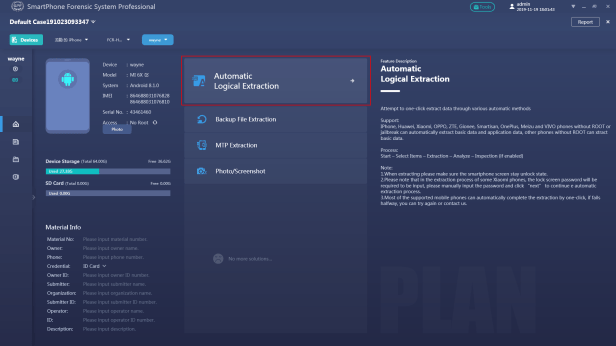
Step 3. Then you can see some recommended solutions for the smartphone, select the Automatic Logical Extraction solution.
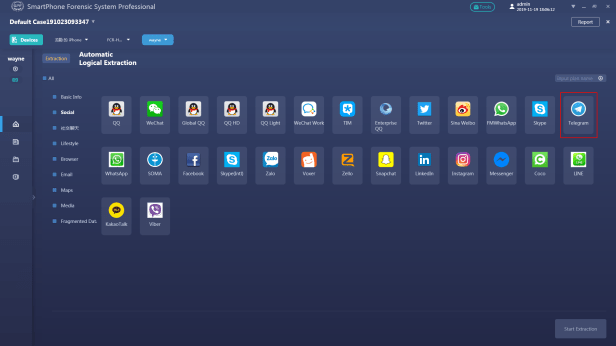
Step 4. After entering the Automatic Logical Extraction, choose the Telegram icon on the social class.
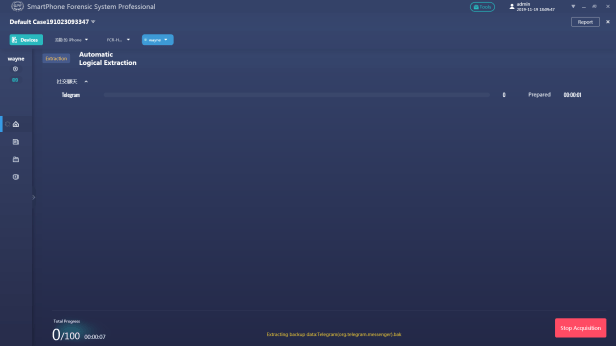
Step 5. Then waiting for the process of the extraction.
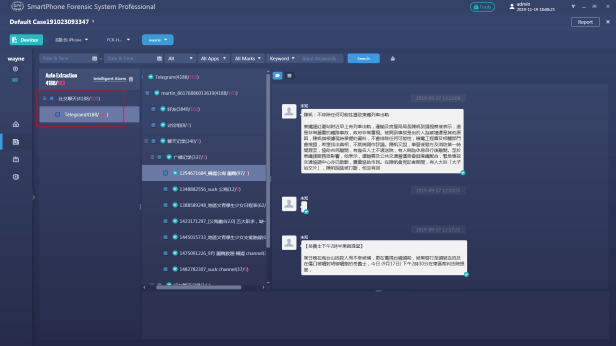
Step 6. After the process has been finished, now we can see the total data number and deleted data number of the Telegram, the total data number is 4188 and the deleted or lost data number is 103.
Conclusion
This article is operation guidance on how to decrypt and extract Telegram app data from a smartphone, and on the upcoming latest SPF Pro version, you will be able to have a trial about this.
Thanks for your time reading our blog. If you are interested in our forensic solutions, come and check out our website for more information. You can also go to our resource page to download our forensic products for free. We welcome you to contact us and claim your free product trial!
 SalvationDATA Blog